Named after Homer’s "swift-footed Achilles", Akileas is engineered for uncompromising responsiveness and deep focus. Markdown syntax unfolds seamlessly at your cursor and settles into clean typography the moment you move on. No split-screen friction, no typing lag—just writing in pure flow.
In Homer’s Iliad, the hero Achilles is celebrated as "swift-footed" (πόδας ὠκὺς Ἀχιλλεύς)—embodying razor-sharp agility, unhindered momentum, and pure velocity. In an era where writing tools are weighed down by heavy web runtimes and sluggish electron wrappers, Akileas reclaims that effortless speed: immediate keystroke response, quiet simplicity, and a canvas that gets out of your way.
“As a prize-winning steed with its chariot sweeps lightly over the plain in full career,
so Achilles swiftly plied his nimble feet and knees.”
— Homer, The Iliad, Book XXII (lines 22–24)
Continuous Interactive Canvas
What you write is what you read.
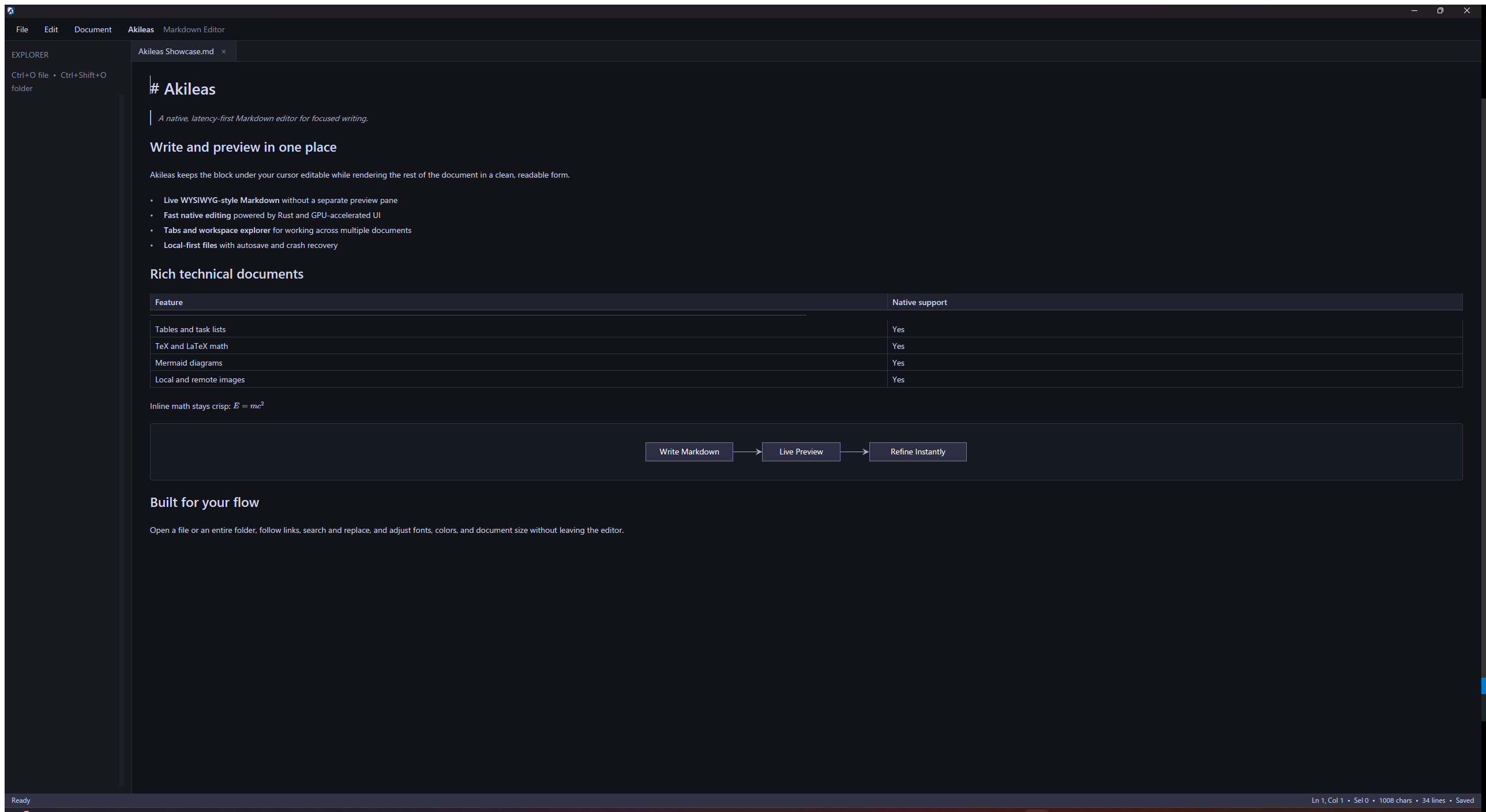
Markdown syntax reveals itself only on the active line under your cursor, instantly settling into refined typography as you navigate away. No dual-pane splits, no mental context switching—seamlessly bridge authoring and reading on a single surface.
Akileas Showcase.md
Unified native desktop workspace displaying live Markdown, math equations, Mermaid diagrams, workspace navigation, and Agent diagnostics.
Core Features
Engineered for Focus, Grounded in Precision
Light enough to disappear beneath your thoughts, capable enough for complex technical manuscripts.
I
In-Place Hybrid WYSIWYG
Eliminate fractured side-by-side preview panes. Raw Markdown syntax expands only on the active line under your cursor. Headings, lists, tables, links, and bold text render inline in real time, keeping your canvas immaculate.
## Immersive Writing FlowOnce your cursor moves ahead, text settles smoothly into publication-grade layout.
II
GitHub Alert Callouts
Full support for standard GFM alert syntax: [!NOTE], [!TIP], [!IMPORTANT], [!WARNING], and [!CAUTION]. Syntax expands while editing and folds into softly accented, refined callout cards as your cursor moves past.
TIP · Callout Block
Syntax folds away into a quiet, elegant card the moment your cursor leaves the line.
III
Smart Table Navigation & Alignment
Complete support for Markdown column alignment syntax (:--- left, :---: center, ---: right). Glide effortlessly across cells with Tab and Shift-Tab; pressing Tab in the final cell automatically appends a new row.
Module (:---)Status (:---:)Latency (---:)
Incremental Re-parseActive0.18 ms
Hardware-Accelerated CounterReady0.05 ms
IV
Native Math & Diagram Rendering
First-class support for TeX/LaTeX formulas, Mermaid flowcharts and sequence diagrams, syntax-highlighted code fences, and task lists. Rendered natively by the GPU with zero browser runtimes or heavy script engines.
E = mc²
V
Built-in Time Machine & Auto-Recovery
Every save automatically captures up to 100 lightweight snapshots, complete with offline diff inspection and one-click rollback. Backed by a bounded binary recovery log, unsaved work survives unexpected crashes and power outages.
Current Snapshot
Just now · 2,410 words · clean
Save Checkpoint · v0.1.0
15 mins ago · +18 lines
Restore
VI
Instant Text Analytics
Hardware-accelerated scanning segments ASCII text, CJK double-width characters, and punctuation accurately in sub-millisecond time. Word, character, and line metrics update like clockwork with every keystroke.
Chars128,490
Words32,840
Lines4,120
0.05 ms
VII
Eye-Care Themes & Local-First Privacy
Switch seamlessly between soothing Eye-Care Parchment and deep Midnight Dark. 100% of your documents remain on your local drive. No accounts, no cloud sync lock-in, no telemetry.
Eye-Care Parchment
Midnight Dark
VIII
Agent Configuration Workbench
Native parsing and validation for SKILL.md, AGENTS.md, and assistant configurations. Inline diagnostics highlight missing frontmatter keys or formatting errors with one-click automated fixes.
Frontmatter metadata name mismatchOne-click auto fix available
Technical Precision
Thoughtful Details for Serious Writing
From subtle typographic accents to multi-thousand-word engineering documentation, every interaction is carefully honed.
Interactive Tasks & Collapsible Details
Native support for - [ ] and - [x] task lists with direct mouse-click toggling; native <details> and <summary> support lets you expand and collapse long technical asides with ease.
Supports relative local paths and remote network URLs with explicit width attributes (e.g., <img width="400">). Dedicated worker threads decode images into GPU textures, ensuring stutter-free scrolling even in image-dense manuscripts.
A hardware-accelerated matching core scans millions of lines without ever locking the interface. Use Ctrl+F for rapid find, Ctrl+H for batch replacements, and Ctrl+G to jump straight to a line.
Hardware AcceleratedBatch ReplaceGo to Line
Instant Session Resume & Typography
Saves exact cursor coordinates, scroll lines, and sub-pixel offsets upon exit, restoring your exact writing context on launch. Seamlessly switch between system sans, serif, or monospace with dynamic scaling from 10pt to 32pt.
Session MemoryFont SwitchingDynamic Scaling
Workspace Tree & Syntax Diff
Work across multiple documents or entire project folders. The sidebar workspace tree automatically scans Markdown files, while native ```diff``` code fences provide clear red/green side-by-side comparisons.
Workspace TreeMulti-Tab ViewSyntax Diff
Latency-First Architecture
The UI Thread Never Waits.
Latency is treated as an uncompromising invariant. Each keystroke is applied as a single lightweight edit and immediately repaints a provisional view of the affected line; full re-parsing, layout calculation, and persistence then converge asynchronously in the background.
Fast Track · What You Feel (under 1 ms)Type to render: never blocked, never waiting, no redundant work
IKeystroke
A single, self-contained edit
→
IIVersion Stamped
Each edit carries a newer version number
→
IIILine Repainted
Only the touched line is redrawn
→
IVOn Screen
Character and cursor visible within a fraction of a frame
Convergence Track · What Happens Behind YouHighlighting and typesetting catch up without ever interrupting you
IOnly What Changed
Just the affected lines are re-read
→
IIReusing the Rest
Everything untouched is kept as-is
→
IIIFresh Rendering State
A complete, up-to-date picture of the document
→
IVSwapped In
Outdated results are discarded, never shown
Three Independent Pipelines
Formulas, diagrams, and tables compute independently.
LaTeX formulas wait until you pause typing; Mermaid diagrams are rendered only where you can see them; tables measure their own columns. Editing prose never triggers a costly diagram recalculation.
Formula SnapshotsMermaid Viewport CacheAdaptive Tables
Text and Graphics Kept Apart
The work is split so neither side waits on the other.
Text editing, cursor hit-testing, incremental re-parsing, and statistics happen on the processor; glyph rendering, layer compositing, and vector drawing happen on the graphics card.
Text EngineGlyph Shaping CacheGPU Hardware Acceleration
Resilient Crash Recovery
Protecting your thoughts against sudden power loss.
A built-in time machine retains up to 100 historical snapshots with offline diffing, paired with a lightweight recovery journal that restores unsaved work immediately upon restart.
Akileas processes all your documents strictly on your local machine. Network activity occurs only when you explicitly open external links or load remote assets.